
Home Media Server in 2026: NAS, Seedbox or Cloud Drive?
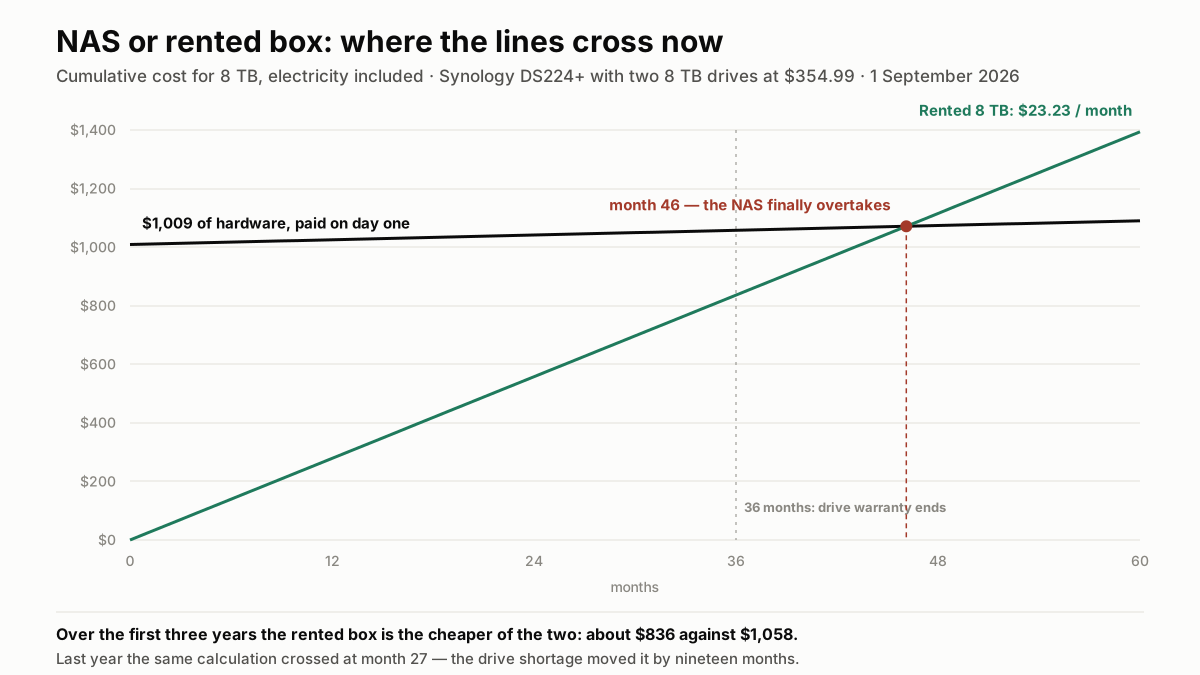
The NAS used to overtake after two years. With 8 TB drives at $355 apiece, it now takes 46 months — longer than the warranty on the drives. Full 36-month breakdown, electricity included.
Every media library ends up in the same three-way argument: buy a NAS and own the hardware, rent a box in a datacentre and pay monthly, or throw everything in a cloud drive and hope a media server can read it. The cost comparison is usually done badly, because the NAS side is quoted as a purchase price and the rented side as a subscription — two numbers that are not comparable until you put them on the same 36-month line and add the electricity. We did that with prices checked on 1 September 2026, and the answer has changed since last year: the drive shortage has pushed an 8 TB NAS disk to $354.99, which moves the break-even point past the warranty on the drives themselves.
The three architectures, stated plainly
They are not three versions of the same thing — they fail in different places.
NAS at home
A small always-on box with two to four drive bays, sitting on your home network. Plex, Jellyfin or Emby runs on it directly. The files never leave your house unless someone streams from outside, in which case they go out through your internet connection's upload path. You own the drives; you also own the failures.
Rented box in a datacentre
A shared or dedicated slice of a server with disk attached, rented monthly, with a control panel that installs the media server in one click. It is on a 10 Gbps port or better, powered and cooled by someone else, and it disappears the day you stop paying. Storage is fixed per tier, and most providers meter monthly traffic.
Cloud drive
Google One, Dropbox, OneDrive: excellent for files, awkward for media. There is no media server, so playback means mounting the drive elsewhere with Rclone and pointing Plex at it — which works, until you read the provider's terms on sustained streaming. Around $10 a month for 2 TB, roughly the price of a rented box that actually runs the server for you.
What changed in 2026: the drives
Any NAS comparison written before this year is now wrong, and the reason has nothing to do with NAS manufacturers.
AI datacentre operators want exactly the drives NAS owners want — high capacity, low power, best cost per terabyte — and they buy them on long-term contracts in volumes the retail channel cannot match. Western Digital and Seagate have confirmed their 2026 production is effectively sold out. What reaches shops is the remainder, at the price the remainder commands.
- NAS drive prices rose roughly 46% between September 2025 and January 2026, with reported increases spanning 23% to 66% depending on the model.
- Another 10% followed in the second quarter of 2026.
- Lead times now stretch to twelve months on some capacities, so "buy it later if I need it" is no longer a plan.
- Analysts do not expect normalisation before late 2027, which is longer than the payback period on the hardware you would be buying today.
Why this belongs in the comparison
The NAS argument has always been "pay once, own it, and it becomes cheaper than renting." That argument depends entirely on the purchase price, and the purchase price has moved by half. Renting, meanwhile, has not: the providers we track publish the same monthly figures as a year ago, because the drives in their machines were bought before the squeeze and their pricing follows their own amortisation, not this week's retail shelf.
The 36-month arithmetic, line by line
Same capacity, same period, electricity included. Hardware prices checked 1 September 2026; power draw is Synology's own published figure.
NAS: $1,058 over three years
- Synology DS224+ (2 bays, Celeron J4125, 2 GB RAM): $299
- Two 8 TB WD Red Plus drives at $354.99 each: $710 — 16 TB raw, 8 TB usable in RAID 1
- Electricity: Synology rates the DS224+ at 14.69 W in access and 4.41 W with drives asleep. Averaging 10 W around the clock is 87.6 kWh a year — about $16 a year at the 18.44 ¢/kWh US residential average.
Total: $1,009 up front plus roughly $49 of electricity over three years = $1,058, or $29.38 a month. Not counted: your time, and the drive that fails in year four, out of warranty.
Rented box: about $836 over three years for 8 TB
Hosting By Design's App Box 8 TB is €19.95 a month — about $23 — with 25 TB of monthly traffic on a 10 Gbps port. Over 36 months, roughly $836. SeedHost.eu HD 9 sits close by at €20.25 for 9 TB, and Ultra.cc Steel at €21.95 for 8 TB on a 50 Gbps port with 20 TB of traffic. No hardware, no electricity, no RAID to rebuild, and no exposure to the drive market.
Cloud drive: about $360 over three years for 2 TB — without the server
Around $10 a month for 2 TB. It is the cheapest per gigabyte of the three and the only one that does not include a media server, transcoding or a client app. You are buying storage, then renting somewhere else to actually serve it.
The crossover: month 46, not month 27
Once the NAS is bought, its running cost is electricity — about $1.35 a month. The rented 8 TB box costs about $23.23. The monthly difference is $21.88, so $1,009 of hardware pays for itself in 46 months, just under four years. At last year's drive prices the same calculation landed at 27 months.
Two things follow from that, and they matter more than the headline number:
- The break-even now falls outside the warranty. WD Red Plus drives carry a three-year limited warranty. A drive that dies in month 40 is replaced at your expense, at whatever 8 TB costs then — and that resets the payback clock.
- Below 4 TB the NAS does not catch up at all in any reasonable horizon: a two-bay enclosure with a single drive is around $650 today, against €6.59 a month for a rented 1 TB box.
- Very large libraries still favour buying — 16 TB or more rented is €39.95 to €49.95 a month indefinitely — but the entry ticket has roughly doubled, so the decision now needs a five-year horizon rather than a two-year one.
- Waiting is not obviously wrong. With normalisation not expected before late 2027, the case for renting now and buying when the market calms is stronger than it has been in years.
The number that actually decides it: your upload speed
A NAS streams to the outside world at your connection's upload rate, and that is the constraint nobody checks before buying one. Inside the house it is irrelevant — gigabit ethernet handles anything. The moment someone watches from elsewhere, your uplink is the whole system.
What a stream needs:
- One 1080p stream: roughly 8 Mb/s.
- One 4K HDR stream: 25 to 40 Mb/s.
- A household of three watching different things in 1080p: about 24 Mb/s sustained, before anything else on your line.
What that means by connection type
Cable connections in North America are asymmetric by design, with upload a small fraction of the advertised download figure — enough for one or two 1080p streams, rarely for 4K. Fibre to the home is generally comfortable, with upload commonly running from several hundred megabits to symmetric gigabit. DSL is not: an upload path around 1 Mb/s cannot serve a single 1080p stream, full stop.
A rented box removes the question. Every provider we track runs at 10 Gbps or above — Ultra.cc and Seedboxes.cc at 50 Gbps, Whatbox from 40 to 100 Gbps — so the limit becomes the monthly traffic allowance rather than the pipe. Three of the twelve ship uncapped traffic on their entry plan; the rest meter it, and we listed who does what in our uncapped-versus-metered comparison.
What the NAS does better
Four real advantages, none of which are about price any more:
- You own the drives. No account to lose, no provider to shut down, no terms of service that change. Our look at providers that folded in 2026 is a reminder that rented storage has counterparty risk.
- Your files stay in your house, which for personal video and documents is a privacy answer that no hosting contract matches.
- Local playback is instant and free, and never touches your internet connection or a traffic quota.
- Capacity is what you install, not what a tier permits — though at today's prices, adding a drive is a $355 decision rather than a $150 one.
What the rented box does better
Also four, and they are the mirror image:
- Upload capacity that no home connection matches — the single biggest practical difference, and the reason people migrate away from a NAS after their first shared library.
- No exposure to the hardware market. The provider absorbed the drive shortage; your monthly price did not move.
- Nothing to maintain. No drive replacements, no RAID rebuild at 2 a.m., no UPS, no fan noise, no summer heat problem.
- Changing your mind is cheap. Wrong size? Move a tier. Wrong provider? Leave. The NAS equivalent is buying drives you keep — and drives are the expensive part now.
- Downloading happens at datacentre speed, on a machine that is already online 24/7 — which is what the whole automation stack is built around, as our guide to the *arr stack covers.
Why a cloud drive is not a media server
It is the cheapest storage of the three and the most tempting on a spreadsheet, and it fails on four specific points.
- No media server. Google One and Dropbox store and sync; they do not index a library, fetch metadata, transcode, or hand your TV an app.
- Playback means Rclone plus a server elsewhere. Once you have rented that server, you have paid for both — at which point a single rented box with the disk attached is cheaper and simpler.
- Sustained streaming is not what the terms describe. Consumer sync services size their bandwidth for sync bursts, not for continuous reads, and API rate limits show up as buffering.
- No transcoding, ever. Storage has no CPU, so device compatibility becomes entirely your problem.
Choosing in four questions
In order, because the first two usually settle it:
- What is your upload speed? Under 10 Mb/s, a NAS cannot serve anyone outside the house — rent. Symmetric fibre, and the NAS is viable.
- Who watches, and from where? Household only, on the local network: the NAS still makes sense. Family in three cities: the datacentre wins on day one.
- How long will you keep this? Under four years, rent — you will not reach the crossover at today's drive prices. Five years and 8 TB or more, buying still wins.
- Do you want to administer a machine? The NAS is a small server with your name on the support contract. If that sentence sounds like a hobby, buy one; if it sounds like a chore, rent.
The pragmatic middle, and it is stronger this year
Rent first, buy later. A rented box costs €6.59 to €19.95 a month, is running fifteen minutes after you pay, and tells you within one month how large your library actually gets and how much traffic you really use. Those two numbers are exactly what you need to size a NAS properly — and with drive prices not expected to normalise before late 2027, deferring a $1,000 purchase is not procrastination, it is timing. Compare the live plans before committing to hardware.
Frequently asked questions
Is a NAS still cheaper than a seedbox in the long run?+
Why did NAS hard drives get so expensive in 2026?+
How much electricity does a NAS use for a media library?+
Can I run Plex on a NAS and stream outside my home?+
Can I use Google Drive or Dropbox as a Plex library?+
Should I buy drives now or wait?+

Ready to pick your seedbox?
Compare live prices, storage and upload allowances across every provider we track — then grab the current deal.