
The *arr Stack Explained: Automate Your Media Library End to End
Sonarr and Radarr are on every provider we track. Prowlarr, Bazarr and Overseerr are on none of their published app lists. Here is the whole pipeline, the hosting reality, and the traps.

A media server shows you what you already have. The *arr stack is what puts things in it: you say you want a series, and the episode appears, renamed, subtitled and sorted into the right folder, without you touching anything again. It is a genuinely good piece of open-source engineering, and it is also the point where people create a mess — half a dozen web interfaces, three of which are quietly fighting each other over the same folder. This guide covers what each application actually does, how the pipeline fits together, what the providers we track really install in one click (the answer is less than the internet assumes), and the five configuration mistakes that fill a disk in a fortnight.
What each piece actually does
Six roles, and you do not need all of them on day one.
Prowlarr or Jackett — the indexer manager
Both do the same job: they speak to your trackers and indexers, and expose them to the other applications through one interface. Jackett is the older approach and is configured from each application; Prowlarr is the current one and pushes its indexer list to Sonarr, Radarr and Lidarr automatically, so a new tracker is added once rather than four times. Every provider in our index offers Jackett; none list Prowlarr, which is worth knowing before you plan around it.
Sonarr — TV series
You add a series; Sonarr tracks the season and episode calendar, searches your indexers as episodes are released, hands the result to your download client, then renames and files it. It also handles upgrades: set a quality profile and it will replace a 720p file when a 1080p version turns up, then stop.
Radarr — films
The same design applied to films. Add a title — including one that has not been released yet — and it monitors until a version matching your quality profile appears. Radarr's custom formats are where you spend your configuration time: they are what stop you accumulating six copies of the same film in different encodes.
Lidarr — music, and the gap where Readarr was
Lidarr does for albums what Sonarr does for episodes, and is available on nine of the twelve providers we track. Readarr, the equivalent for books, was retired on 27 June 2025 — the project's metadata source became unusable, and the LinuxServer Docker image was archived on 6 July 2025. Community mirrors and forks exist, unsupported. If a guide still tells you to install Readarr, it has not been updated in a year.
Bazarr — subtitles
Bazarr watches the Sonarr and Radarr libraries and fetches subtitles in the languages you set, including forced and hearing-impaired tracks, with scoring so you get a version that is actually synchronised. It is the piece that separates a library that works for a family from one that works for you alone.
Overseerr or Jellyseerr — the request interface
A clean front end where the people you share with search for a title and click request. Approved requests go straight into Radarr or Sonarr. Overseerr targets Plex; Jellyseerr is the fork for Jellyfin and Emby. This is what stops your household texting you titles at 11 p.m., and it is the piece most people install last and wish they had installed first.
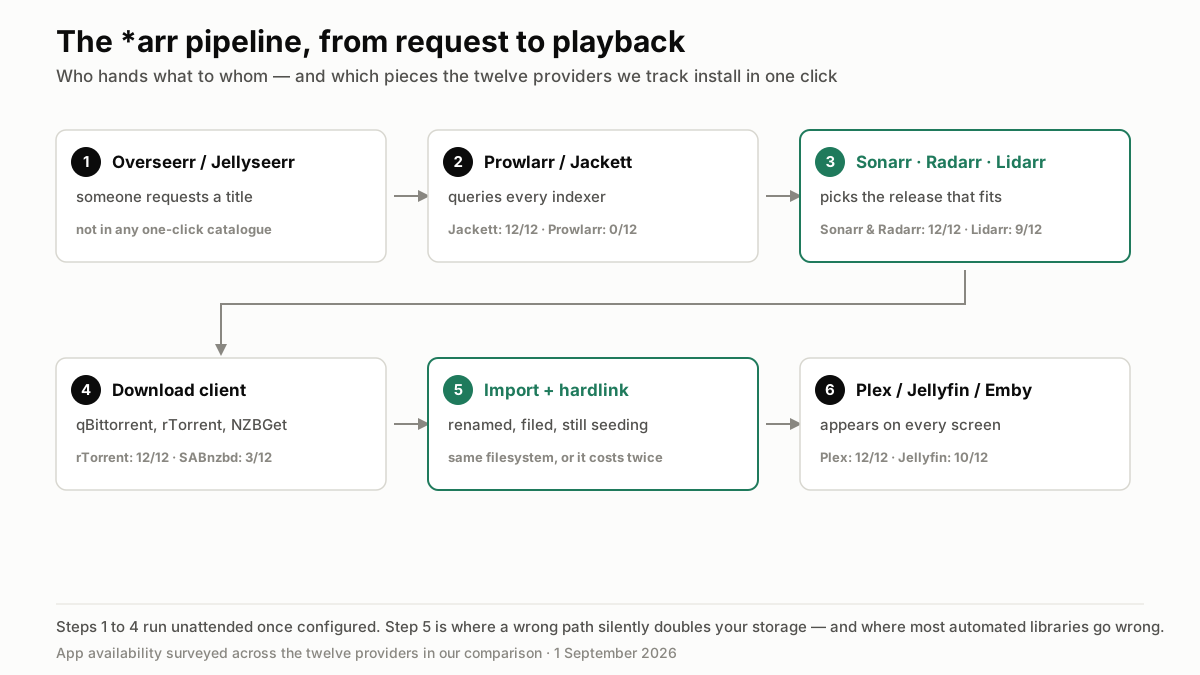
The pipeline, from request to playback
Six steps, all automatic after the first:
- Someone requests a title in Overseerr or Jellyseerr — or you add it directly in Sonarr or Radarr.
- Sonarr or Radarr searches through Prowlarr or Jackett across every indexer you configured, and picks the release that best matches your quality profile.
- The download client fetches it — qBittorrent, rTorrent, Deluge, Transmission, or SABnzbd and NZBGet on Usenet — into a category-specific folder.
- On completion, Sonarr or Radarr imports it: renames to your naming scheme, hardlinks or moves it into the library folder, and keeps the original in place for seeding if hardlinks are working.
- Bazarr adds subtitles within a few minutes.
- Plex, Jellyfin or Emby picks up the new file, fetches artwork and metadata, and it appears on everyone's home screen. Elapsed time from request to watchable, on a datacentre link: usually minutes.
Why this belongs on a machine that never sleeps
The stack is designed around continuous availability, and that is why it is a poor fit for a laptop and a natural fit for a rented box.
- It works while you do not. Monitoring release calendars is a background job; a machine that sleeps at midnight misses the window and retries tomorrow.
- Downloads finish at datacentre speed. A 60 GB season pack on a 10 Gbps port is a coffee break; on a home connection it is an evening, and it competes with everyone else in the house.
- Seeding is the price of access on private trackers, and it requires uptime you cannot get at home without leaving a machine on permanently.
- The library and the downloader share a disk, which is what makes hardlinks possible and halves your storage requirement — see the traps below.
- Your home IP is not involved in any of it, which is the reason most people give for renting rather than running this at home.
What providers actually install in one click
From our own survey of the twelve providers in the comparison — this is where marketing and reality diverge.
Universally available
Sonarr, Radarr, Jackett and rTorrent are on all twelve. Deluge is on eleven, qBittorrent on nine. In other words, the download-and-file half of the stack is a solved problem: pick any provider and it is a checkbox.
Common but not universal
Lidarr on nine of twelve — absent from Hosting By Design, Cloudboxes.io and SeedHost.eu's published lists. Jellyfin and Emby on ten, with Whatbox and a couple of others offering Plex only. Usenet is the real gap: NZBGet on five providers, SABnzbd on three — Feral Hosting, Swizzin and SeedHost.eu are the ones that cover both.
Not published anywhere: Prowlarr, Bazarr, Overseerr
None of the twelve list them in their one-click catalogues. That does not make them impossible — plans with shell access or Docker, and the dedicated tiers in particular, run them fine — but it does mean the three most quality-of-life pieces of the stack are a manual install. If you want them without administering anything, check with the provider before subscribing rather than assuming, and prefer a tier that gives you root.
Setting it up, in the right order
Installing in this sequence avoids most of the reconfiguration people end up doing twice:
- Download client first. Create categories — `tv`, `movies`, `music` — and set a completed-downloads folder that sits on the same filesystem as your library.
- Indexer manager second. Add your trackers in Prowlarr (or Jackett) and test each one before going further; a failing indexer here looks like a broken Sonarr later.
- Sonarr and Radarr third. Connect them to the indexer manager and the download client, define one quality profile each, and set the naming scheme now — renaming a library afterwards is doable but tedious.
- Import your existing files before enabling any monitoring, so the applications know what you already own and do not go looking for it.
- Media server fourth, pointed at the library folders — never at the download folder.
- Bazarr and Overseerr last, once the core pipeline has delivered one file correctly from end to end.
The five mistakes that break an automated library
In the order of how often they come up.
1. Hardlinks that are not hardlinks
If the download folder and the library are on the same filesystem, Sonarr and Radarr create a hardlink: one copy of the data with two names, so the file is seeded and served simultaneously and costs the space once. If they are on different mounts, the import silently becomes a copy, and every download takes twice its size. On a 750 GB plan that is the difference between 150 films and 75. Check the paths before you add anything.
2. No disk-space ceiling
Automation does exactly what you asked, without judgement. A list of 400 monitored films and a quality profile that accepts 4K remuxes will fill any plan on the market. Set quality profiles that reflect what your devices can actually play, cap the size per episode, and check your usage after the first week.
3. Hit-and-run on private trackers
The stack downloads faster than you can supervise, and private trackers count seeding time and ratio. Configure minimum seed time and ratio in the download client, not in your head, and remember that deleting an imported file from the library also removes the hardlinked source if you are not careful.
4. Traffic quotas, discovered on the 28th
Nine of the twelve providers meter monthly upload, from 1 TB to 50 TB depending on the tier. Seeding at 10 Gbps runs through an allowance quickly, and providers throttle or bill overage rather than warn you politely. Either cap the upload rate in the client, or take a plan with uncapped traffic — three providers offer it on the entry tier, and we listed them in the uncapped-traffic comparison.
5. Pointing the media server at the download folder
It appears to work for a day. Then partial files show up in the library, half-downloaded episodes get played, and deletions cascade in ways nobody expects. The media server reads the library folder only — that separation is the entire point of the import step.
What it costs to run properly
Three realistic configurations, using plans from our comparison:
Automation without a media server — from €9
If you download and watch elsewhere, you do not need Plex on the box, which unlocks the cheap tiers that forbid it. SeedHost.eu HD 4 at €9 gives 4 TB with Sonarr, Radarr and Jackett available; Ultra.cc Spirit at €8.75 gives 2 TB on a 50 Gbps port. Both block streaming apps, which does not matter here.
Automation plus streaming — from $10
DediSeedbox Starter at $10 carries 750 GB with Sonarr, Radarr, Lidarr, Jackett, Plex, Emby and Jellyfin, and uncapped traffic — the one that removes the quota question. Above it, Ultra.cc Tin at €13.95 for 4 TB and SeedHost.eu HD 7 at €15.75 for 7 TB are the comfortable tiers once hardlinks are working and the library grows.
The full stack with Prowlarr, Bazarr and Overseerr — $30 and up
Since those three are not one-click anywhere, you want shell or Docker access, which in practice means a dedicated tier: RapidSeedbox Premium Stream at $33 (six cores, 7 GB of RAM, uncapped traffic) or Hosting By Design App Box 18 TB at €39.95 with unmetered traffic. This is also the tier where transcoding stops being a problem, which our Plex hosting guide goes into.
Whichever way you go, check storage, traffic and app availability side by side on the full comparison — for this use case, app availability matters as much as the price.
Frequently asked questions
Do I need Prowlarr if I already have Jackett?+
Is Readarr still part of the *arr stack?+
Why do my downloads take twice the space they should?+
Can I run the *arr stack on a plan that blocks Plex?+
How much storage should I plan for an automated library?+
Will automation get me in trouble with my provider?+

Ready to pick your seedbox?
Compare live prices, storage and upload allowances across every provider we track — then grab the current deal.