
Build Your Own Netflix for $10 a Month: The Real 2026 Numbers
Four subscriptions, no ads, $62.96 a month before you have watched anything. A Plex or Jellyfin server on a rented box starts at $10 — here is the full arithmetic, and where the cheap version breaks.
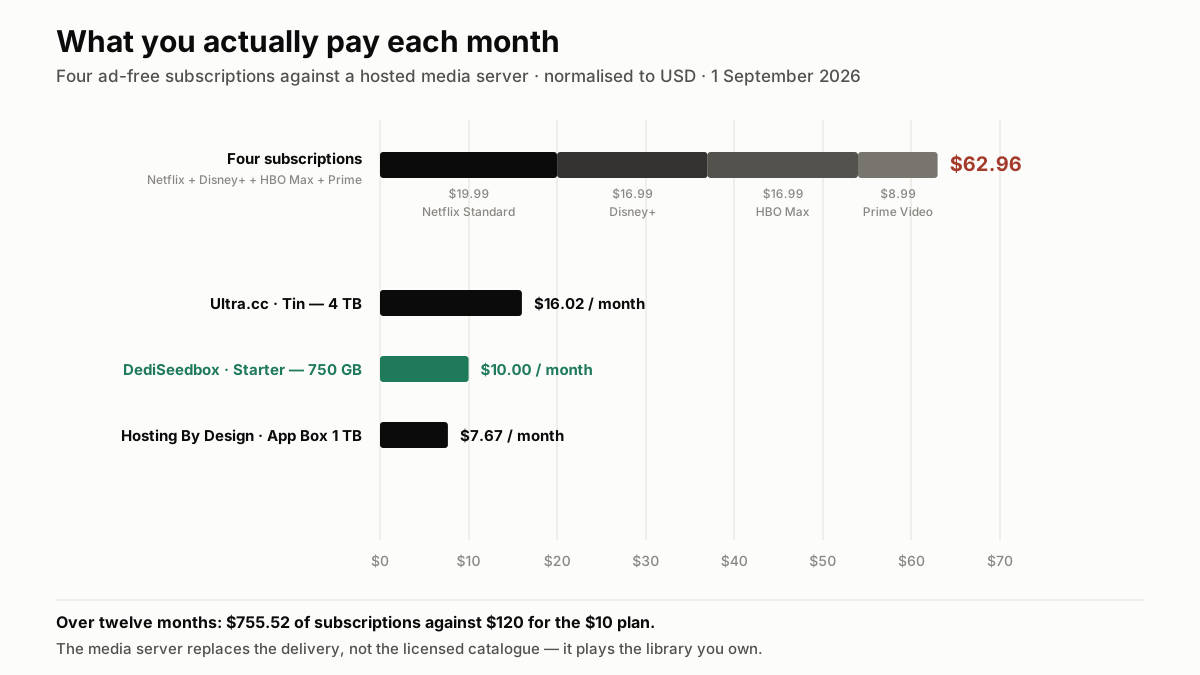
Four ad-free subscriptions — Netflix, Disney+, HBO Max and Prime Video — come to $62.96 a month, checked on 1 September 2026. That is $755 a year for a catalogue that removes titles without warning you and re-encodes them at whatever bitrate the platform feels like. The alternative everyone has heard of is to "build your own Netflix": a media server that streams a library you control, from a machine you rent by the month. The software is free, the idea is sound, and the monthly figure genuinely starts at $10. What almost nobody spells out is what that $10 buys, how much library it actually holds, and the three points where the cheap version fails silently. Here is the arithmetic, against the live pricing of the twelve providers we track.
What "your own Netflix" means — and what it does not replace
The phrase covers a precise setup: a media server — Plex, Jellyfin or Emby — running on a machine that stays online, holding files you own, and streaming them to your TV, phone, tablet and browser through an interface that behaves like a commercial service. Posters and synopses fetched automatically, seasons in order, resume-where-you-left-off across devices, separate profiles for each person in the household, subtitles, and a client app on nearly every TV platform.
Four things it gives you that a subscription does not:
- A catalogue that does not change underneath you. Nothing disappears at the end of a licensing window. The film you added in 2021 is still there in 2029.
- One bill instead of four, and no annual increase decided elsewhere.
- Your own quality ceiling. Platforms compress to their own targets and reserve 4K for their top tier. Your server plays the file exactly as you stored it.
- No account sharing rules. The people you give access to are the people you decide, without a per-member surcharge.
What it does not do
It does not give you access to Netflix's, Disney's or HBO's catalogue. A media server plays what you put in it: Blu-rays and DVDs you own and have ripped where local law permits, digital purchases, home video, public-domain and Creative Commons material, and files from legal sources.
Renting a server changes nothing about copyright law where you live, and every provider in this comparison suspends accounts over what its jurisdiction treats as infringement — enforcement moved up the stack in 2026, as our rundown of this year's blocking decisions sets out. Read this guide as a hosting-cost analysis, because that is what it is.
The bill you are actually trying to replace
Prices below are the ad-free tiers in the United States, checked on the providers' own pages on 1 September 2026. Ad-supported tiers are cheaper and are listed underneath, because comparing an ad tier to a personal server is not a fair comparison — your own library has no ads by construction.
$62.96 a month, $755.52 a year
- Netflix Standard: $19.99
- Disney+ (No Ads): $16.99
- HBO Max (Ad-Free): $16.99
- Prime Video standalone: $8.99
Netflix raised all three of its tiers in March 2026: Standard with ads is now $8.99, Standard $19.99 and Premium $26.99. With every service on its ad tier instead, the same four come to $37.96 a month.
The comparison that matters
A hosted media server at $10 a month costs $120 a year. Against those four ad-free subscriptions, that is $635 a year kept. The honest caveat: subscriptions buy content, and the server buys delivery. What you save is the delivery layer plus the platform's margin — not the cost of acquiring what you watch.
The three parts of the stack, and what each one costs
A media server is only three things. Two of them are free.
1. The software — €0
Jellyfin is free and open source, with no account, no subscription and no upsell. Plex is free for the server and for local playback; a Plex Pass (subscription or lifetime) unlocks hardware transcoding, offline sync and mobile playback without the one-off app fee. Emby sits between the two. All three index your files, fetch metadata, and hand each device a client app.
On hosting, the practical difference is that Whatbox requires an active Plex Pass to run Plex on its plans — a second subscription to add to the bill. Jellyfin removes that question entirely.
2. The storage — the only variable that really moves
This is where your monthly figure is decided. Across the plans we track, storage that allows a media server runs from 750 GB at $10 to 28 TB at €59.95, and the price per terabyte falls steeply as you climb — our cost-per-terabyte breakdown puts the spread between $3 and $17 per TB depending on the tier.
3. The uplink — where a rented box wins outright
A media server at home streams at your upload speed, which on most residential connections is a fraction of the download figure advertised. Two 1080p streams need roughly 16 Mb/s of sustained upload, one 4K stream around 25 to 40 Mb/s. Rented boxes sit on 10 Gbps ports and up — Ultra.cc and Seedboxes.cc advertise 50 Gbps, Whatbox 40 to 100 Gbps — so the uplink stops being a constraint and the question becomes the monthly traffic allowance instead.
How much storage a real library actually needs
Rough sizes, which is all you need to size a plan:
- TV episode, 1080p: 1 to 2 GB — call it 1.5 GB, so a 10-episode season is about 15 GB.
- Film, 1080p web-quality: 4 to 6 GB.
- Film, 1080p Blu-ray remux: 20 to 30 GB.
- Film, 4K HDR in HEVC: 15 to 25 GB.
- Film, 4K remux: 50 to 80 GB — this is the one that eats plans alive.
- Music, FLAC: roughly 350 MB per album.
What each tier holds in practice
- 750 GB (DediSeedbox Starter, $10): about 150 films in 1080p, or 500 TV episodes, or 37 films in 4K HEVC.
- 1 TB (Hosting By Design App Box, €6.59): about 200 films in 1080p.
- 4 TB (Ultra.cc Tin, €13.95): about 800 films in 1080p, or 200 in 4K — the point where you stop deleting things to make room.
- 8 TB (Hosting By Design App Box 8 TB, €19.95): a library you will not fill by accident.
Most people overestimate. A library of 150 films and a dozen series is more than a household watches in a year, and it fits in the $10 plan.
The plans that genuinely do it, at four budgets
Every plan below allows Plex, Emby or Jellyfin on the tier quoted — not somewhere else in the provider's catalogue. Prices are the providers' own, in their billing currency.
$10 — DediSeedbox Starter, the reference point
750 GB, 10 Gbps, traffic uncapped, Plex + Emby + Jellyfin, 50+ one-click apps. The reason this is the reference is uniformity: every tier from Starter at $10 to Pro at $30 (5 TB) carries the same specification, so upgrading is a storage decision and nothing else. Uncapped traffic on the entry plan is rare — most providers meter it. Our DediSeedbox review has the detail, and the current deal is a 50% discount on the first month through the link below.
€6.59 — Hosting By Design App Box 1 TB, the cheapest that streams
1 TB, 10 Gbps, Plex allowed, but 3 TB of monthly traffic. The cheapest streaming-capable plan on the market as we track it. The 3 TB ceiling is generous for one household and tight if you share the library — that is the trade you are making for the price.
€13.95 to €15.75 — the comfortable middle
Ultra.cc Tin gives you 4 TB with 10 TB of traffic on a 50 Gbps port, and it is the first Ultra.cc tier where streaming apps are permitted at all. SeedHost.eu HD 7 gives you 7 TB for €15.75 with 11 TB of traffic — more disk per euro, on a 10 Gbps port. Whatbox H3-4 offers 3.9 TB at €14, with the Plex Pass caveat above.
$33 — RapidSeedbox Premium Stream, when you need to transcode
Everything above is shared hosting: excellent for direct play, variable when the server has to re-encode on the fly. Premium Stream is a dedicated VPS with six cores and 7 GB of RAM, uncapped traffic on 10 Gbps, and servers in five countries. If several people watch simultaneously on devices that cannot handle your files natively, this is the tier that stops the stuttering. Full context in our guide to seedboxes for Plex.
Where the $10 version quietly breaks
Four failure modes, in the order people hit them.
The cheapest plans forbid the media server
Ultra.cc marks Lancer and Spirit — €6.50 and €10.95 — as "Plex, Jellyfin or Emby: Not Allowed" on its own pricing grid. SeedHost.eu unlocks streaming apps only from HD 7 upward, so its €3 and €5 plans are download boxes. RapidSeedbox restricts its Lean range ($9 and $15) to torrent clients. If you compared those against a $10 plan on price alone, you were comparing two different products.
Traffic is metered nearly everywhere
Watching two hours a day in 1080p at 8 Mb/s uses about 220 GB a month. The same two hours in 4K at 25 Mb/s uses about 680 GB. Add three relatives streaming from the same library and a 3 TB allowance disappears. Only three of the twelve providers we track ship uncapped traffic on their entry plan — the full list is in our uncapped-versus-metered comparison.
Transcoding is CPU, and shared plans have little of it
Direct play — the client reading the file as stored — costs almost nothing. Transcoding happens when the device cannot handle the codec, container or bitrate, and it is CPU-bound. On a shared tier, one 1080p transcode is usually fine and 4K generally is not. The cheap fix is not a bigger plan: it is storing files your devices can play natively, and using the Plex or Jellyfin app on the TV rather than casting through a browser.
Libraries grow faster than you plan for
750 GB is 150 films until the day you start keeping 4K, at which point it is 37. Decide the quality ceiling before you choose the plan, and if you intend to keep 4K remuxes, start at 4 TB.
Setting it up in one evening
Nothing here requires a Linux background — every provider in this list installs the server software from a control panel.
- Pick the plan on storage, after checking the media server is allowed on that exact tier.
- Install the media server in one click from the provider's app catalogue — Plex, Emby and Jellyfin are all one-click installs at DediSeedbox, RapidSeedbox, Ultra.cc, Whatbox, Seedboxes.cc, GigaRapid, Pulsed Media and SeedHost.eu.
- Create two folders, `Movies` and `TV`, and name your files properly — `Film Name (2019).mkv` and `Series Name S01E03.mkv`. Metadata matching depends entirely on this, and it is the single step people skip and then blame on the software.
- Point the server at those folders and let it build the library; posters, synopses and cast arrive on their own.
- Install the client app on the TV, phone and laptop, sign in, and check one file plays without transcoding — the server tells you which mode it used.
- Add remote access — Plex handles it automatically; on Jellyfin you publish the server URL. Both work over the provider's own domain, so there is nothing to open at home.
The twelve-month arithmetic
Against four ad-free subscriptions, a $10 plan costs $120 a year instead of $755.52 — $635 kept. Even the comfortable 4 TB tier, Ultra.cc Tin at €13.95 (about $16 a month), comes to roughly $190 a year, a quarter of the subscription bundle.
What those figures do not include is the content itself, and it would be dishonest to leave that out: subscriptions rent you a catalogue, a server hosts the one you have. Where the switch pays off is if you already own films, if you keep what you watch, if you want quality the platforms do not stream, and if you are tired of a library that shrinks each quarter. Where it does not is if what you actually want is next month's exclusive.
If that first description is you, the practical next step is to compare live prices across every provider with storage and traffic side by side, or to look at the cheapest plans that still allow a media server.
Frequently asked questions
Can I really replace Netflix with a $10 media server?+
How much storage do I need for a personal media library?+
Is Jellyfin as good as Plex for this?+
Will my TV play files from a hosted media server?+
Do I still need a VPN if I have a hosted media server?+
Is running my own media server legal?+

Ready to pick your seedbox?
Compare live prices, storage and upload allowances across every provider we track — then grab the current deal.